KassaBet app: quick setup guide
Setting up the kassabet app on your smartphone or tablet requires no traditional file download. Many beginners start by searching the Apple App Store or Google Play Store, only to find no results or confusing lookalike software. That happens because KassaBet operates entirely through a browser-based web application. You do not need to download an APK file or clear out gigabytes of phone storage to play. Instead, you open your standard mobile browser, visit the casino website, and pin a direct shortcut icon onto your home screen. This creates a lightweight portal that behaves just like a native program, launching in full-screen mode with a single tap.
Before you begin the setup process, make sure your smartphone has a stable internet connection and an updated web browser. While this no download approach saves space and prevents manual update prompts, the lack of a dedicated store application is a plain downside if you prefer managing all your subscriptions and programs in one central place. On the other hand, using a browser shortcut means you immediately get access to over 3,000 games, the full cashier, and 24/7 customer support without waiting for software installations.
| Device Type | Recommended Browser | Setup Steps | Storage Needed | Update Method |
|---|---|---|---|---|
| iPhone and iPad | Safari | Open site, tap Share icon, select Add to Home Screen, tap Add | Under 1 MB | Automatic on page load |
| Android Phones | Google Chrome | Open site, tap three-dot menu, select Add to Home screen, confirm | Under 1 MB | Automatic on page load |
| Mobile Tablets | Safari or Chrome | Open site, open browser menu, tap Add to Home Screen, confirm | Under 1 MB | Automatic on page load |
| Desktop PC | Chrome, Edge, Safari | Open site, click bookmark star in address bar, save to bar | None | Automatic on page load |
Once you complete the three steps in the table above, the KassaBet icon sits directly alongside your everyday phone apps. Every time you tap this shortcut, the platform loads the latest version of the game lobby and cashier automatically. You can register a new account, verify your identity with your phone camera, and manage your euro balance from the exact same interface used on desktop computers.
KassaBet mobile casino: what you can do on your phone
The kassabet mobile casino gives you complete control over your player profile, banking, and gaming sessions without tying you to a desk. When you open the platform on a smartphone, the navigation bar shifts to the bottom of the screen so you can reach the game lobby, cashier, and live chat using just your thumb. Beginners can complete the entire two-minute registration form on mobile by entering their email, password, full name, birth date, residential address, and phone number. Because the platform operates exclusively in euros, all your deposits, bets, and withdrawals are calculated in EUR without hidden currency conversion steps. Our editorial team rates the overall KassaBet platform at 8.7 out of 10, giving the mobile experience a score of 8.2 out of 10 precisely because there is no native store application, even though the browser version runs smoothly.
Your mobile game lobby contains the entire catalog of more than 3,000 titles from over 50 software studios. You can swipe through categories or use the search bar to find popular slots like Big Bass Vegas, Gates of Olympus, Sweet Bonanza, Sugar Rush, and Book of Ra from providers such as Pragmatic Play, Hacksaw Gaming, Novomatic, and Nolimit City. The mobile screen also features the KassaBet Select exclusives, including Rolling Start USA, Coin Craze, and Piggy Banks Crack. If you want to test a slot before risking real funds, simply tap the game tile and select the demo mode option. Most slots run at an RTP between 95% and 97%, and the screen automatically adjusts whether you hold your phone vertically or horizontally. For players chasing larger prizes, the four progressive jackpots (Mini K, Neon, Grand K, and Royal KassaBet) are active on mobile and pay out in full outside the standard daily withdrawal limits. Keep in mind that there is no sportsbook section and no separate category for crash games.
Switching to the live casino tab on your phone connects you to more than 180 live dealer streams provided by Evolution, Pragmatic Play Live, Ezugi, and Playtech Live. You can take a virtual seat at Mega Roulette, Gravity Roulette, Blackjack Le Rouge, Speed Baccarat, or Casino Hold’em, with table limits generally ranging from €0.50 up to €10,000 per round. If you claim a bonus on your phone, pay close attention to the rules before opening live tables. While the welcome package advertises up to €6,000 and 300 free spins across several promotions, your actual first deposit bonus is a 100% match up to €750 plus 100 free spins on Big Bass Vegas (delivered as 20 spins per day for five days, worth €0.20 each). If you deposit €50, you get €50 in bonus money, which carries a steep x35 wagering requirement (€50 multiplied by 35 equals €1,750 in total bets) within 10 days and a €5 maximum bet limit. Standard slots contribute 100% toward this target, table games count for only 10%, and live casino games contribute 0% toward wagering.
Managing your money and loyalty rewards is equally straightforward through the mobile cashier. There are no promo codes at KassaBet; instead, you activate offers like the welcome match, Neon Monday (25% up to €600), Thursday Spins (50 free spins for a €30 deposit or 100 spins for €75, with x30 wagering on winnings), or High Roller Saturday (125% up to €3,000 for a €150 minimum deposit, x40 wagering) by ticking an opt-in box in the cashier before paying. You can deposit a minimum of €20 using Visa, Mastercard, Apple Pay, Trustly, instant bank payment, Skrill, Neteller, or around €30 in Bitcoin, Ethereum, or Tether. Your phone also tracks your progress in the weekly Grand Prix Neon tournament and across the six VIP levels, starting at Green Chip (3% weekly cashback and €3,000 daily withdrawal limit) and climbing through Black Chip, Cyan Chip, Diamond, and Crown up to Cercle Privé (15% cashback and €15,000 daily limit). You earn 1 VIP point for every €10 wagered on slots or €50 on tables, and cashback is paid every Tuesday in real money with zero wagering.
Mobile account verification and withdrawals
Using a smartphone actually makes the mandatory identity check much faster than on a desktop computer. Before you can request your first payout, you must verify your account by uploading a clear photo of your ID document, a recent utility bill or bank statement no older than three months, and a live selfie. With your phone in hand, you can photograph these documents directly inside the profile menu, and the review team typically approves them within 24 to 48 hours. Once verified, you can request a fee-free withdrawal starting from €30 back to your original payment method, up to a monthly cap of €40,000 ( note that Apple Pay is for deposits only). Internal approval takes an average of 4 hours, after which crypto payouts arrive in under 1 hour, Skrill and Neteller take up to 12 hours, Trustly takes up to 24 hours, bank cards take 1 to 3 working days, and SEPA bank transfers take 2 to 4 working days.
KassaBet casino app: iPhone in three taps
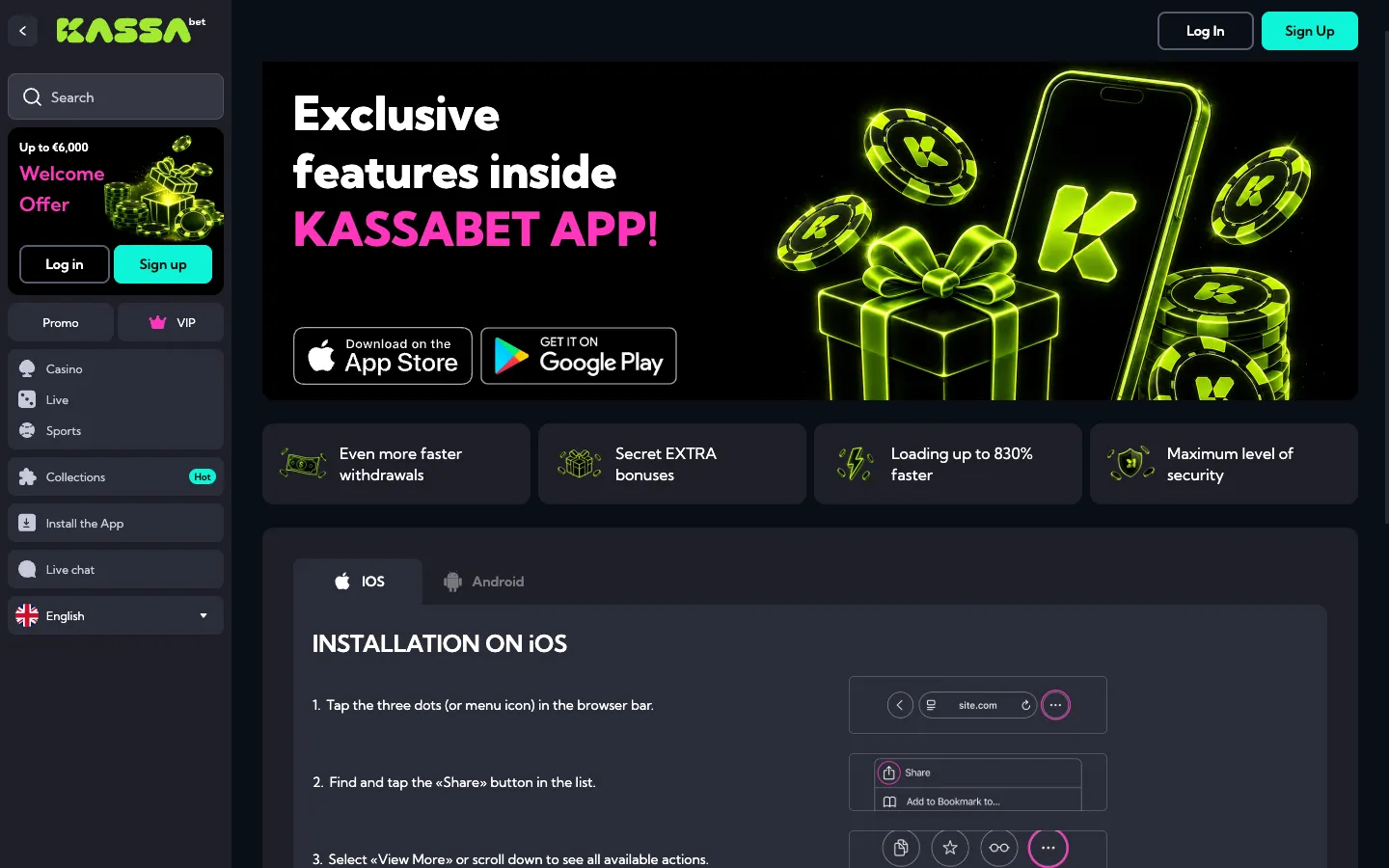
Creating a shortcut for the kassabet casino app on an iPhone or iPad takes less than thirty seconds and relies entirely on Apple’s built-in Safari browser. Because Apple restricts real-money gaming software in many regions and requires heavy system resources for native apps, KassaBet bypasses the App Store completely. By using Safari’s native bookmarking tool, you place a direct web clip onto your iOS home screen. This icon opens the casino in a clean window without the bulky URL address bar or back-and-forward navigation buttons taking up valuable screen space. It gives you maximum viewing area for vertical slot reels and live dealer video streams.
Follow this exact step-by-step checklist on your iOS device to set up your shortcut:
- Unlock your iPhone or iPad and launch the Safari browser (do not use third-party browsers like Chrome or Firefox on iOS, as they sometimes hide the home screen pinning feature).
- Type the KassaBet web address into the search bar and wait for the main lobby to load completely.
- Tap the Share button located at the bottom center of your Safari toolbar (it looks like a small square with an upward-pointing arrow).
- Scroll down through the pop-up action list and tap the option labeled Add to Home Screen.
- Check the shortcut name (you can shorten it to KassaBet so it fits neatly under the icon) and tap Add in the top right corner of the screen.
Once you tap Add, Safari closes the menu and drops the new icon onto the first available spot on your iPhone home screen. You can press and hold the icon to drag it into a folder or onto your main dock just like any regular app. If the Share menu does not show the pinning option or if your screen freezes during setup, you can reach out to KassaBet support via the 24/7 live chat button in the corner of the site. The chat starts with the automated assistant Kassi, who can instantly transfer you to a human agent in English, or you can send an email and expect a detailed reply within 12 hours.
Playing on an iPhone also unlocks the convenience of Apple Pay for instant €20 minimum deposits. When you open the cashier through your new home screen icon, select Apple Pay, tick the bonus opt-in box if you want an active promotion, and double-click your iPhone side button to confirm the payment with Face ID or Touch ID. The funds appear in your balance immediately. Remember that gambling is strictly for adults aged 18 and over, and you can use your iPhone profile settings at any time to set daily deposit limits, session timers, a temporary time-out, or full self-exclusion.
KassaBet app: Android setup steps
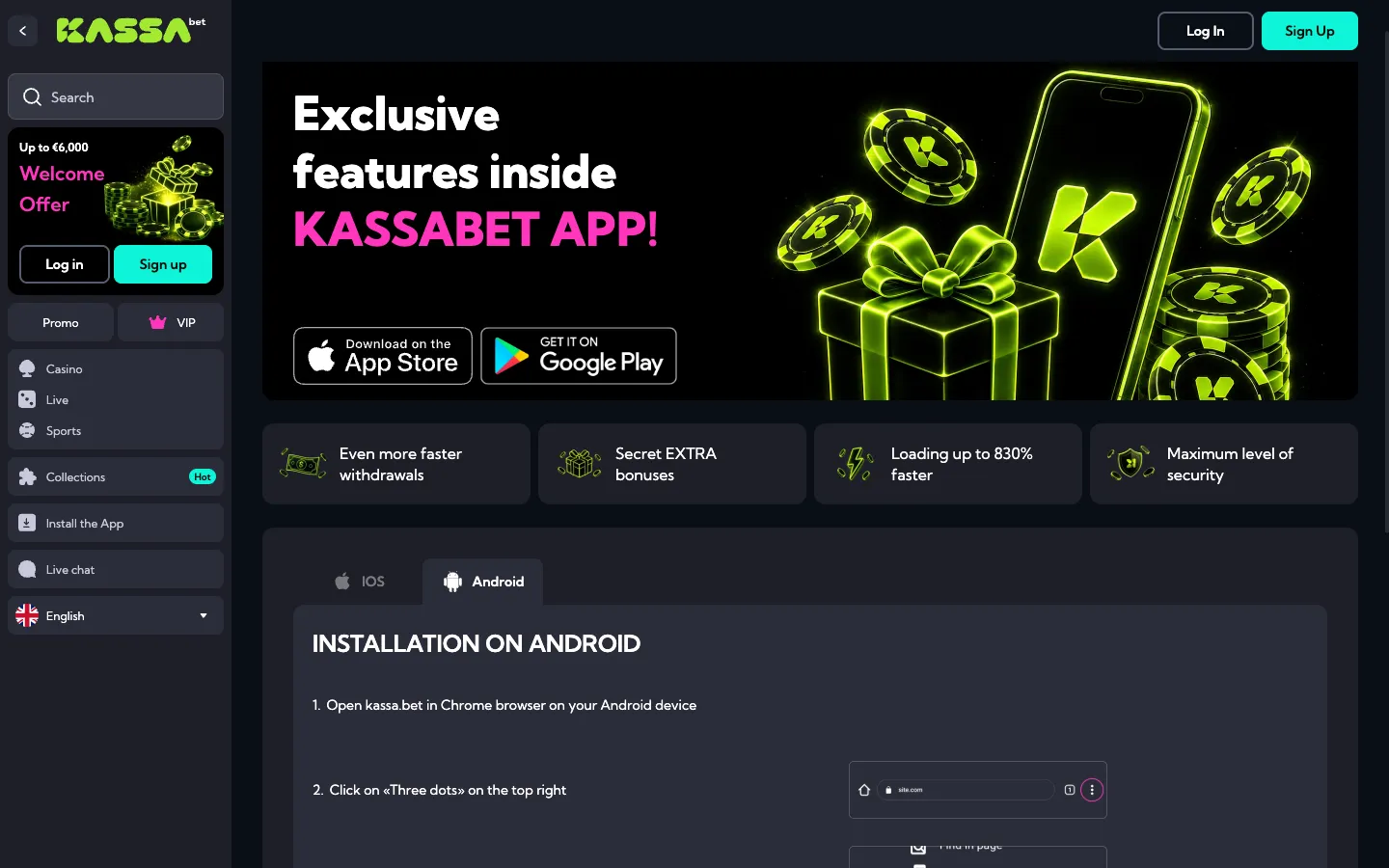
Setting up the kassabet app on an Android smartphone or tablet is the safest way to play on the go without exposing your device to security risks. Across the internet, many third-party websites offer downloadable APK files claiming to be casino software. You should never download or install an APK file for KassaBet, nor should you ever enable the Install Unknown Apps permission in your Android security settings. KassaBet does not produce an APK file. Instead, the platform uses Progressive Web App technology inside Google Chrome, which packages the mobile website into a secure home screen icon without touching your phone’s operating system.
Use this step-by-step checklist to pin the casino to your Android home screen:
- Open the Google Chrome browser on your Samsung, Pixel, Xiaomi, or other Android device.
- Enter the KassaBet website address and let the front page finish loading.
- Tap the three vertical dots located in the top right corner of the Chrome browser next to the address bar.
- Look down the dropdown menu and tap Add to Home screen (on newer Android versions, this may say Install app).
- A small confirmation window will appear; tap Add twice to let Android place the icon directly onto your main screen.
After completing these five actions, you can close Google Chrome and launch the casino directly from the new shortcut on your Android desktop. The web app runs smoothly on any modern Android device with at least 2 GB of RAM and a steady 4G, 5G, or Wi-Fi connection. When you launch a game like Wanted Dead or a Wild, Mental, or Big Bass Bonanza, the browser automatically locks into full-screen mode so you do not accidentally swipe back to your previous web pages while spinning the reels.
If you ever notice that a slot game stutters or the cashier takes too long to display your balance on Android, you do not need to delete and reinstall the shortcut. Simply open your Chrome settings, clear the cached images and files for the site, and reload the page. Make sure your Android battery saver mode is turned off when watching HD video streams in the live casino, as aggressive battery throttling can lower the frame rate on Evolution and Playtech Live tables. Always keep an eye on your session time and use the built-in responsible gaming tools inside your mobile account menu to keep your play safe and within your personal budget.